
Virtual Webhooks vs Polling Jobs: How Integrations Handle Change Detection
March 30, 2026
Last updated: September 20 2026
A virtual webhook detects changes by reading the source API on a fixed interval, comparing what comes back against the last successfully delivered position using timestamps and cursors, and delivering only the records that changed, as events, to your webhook URL. A polling job does the same reading, but inside your application, with your team maintaining the scheduler, cursors and retries. A sync-based notification is different in kind: the platform copies data into its own storage on a schedule and sends you a notification when the sync finishes, which you follow with an API call to fetch what changed. On Unified.to, as of September 2026, a virtual webhook's interval can be as short as one minute on paid plans, nothing is stored between checks, and the event carries the changed records.
For how individual unified API platforms implement these models, see Which Unified API Platforms Support Virtual Webhooks vs Sync-Based Notifications. For how to evaluate a "real-time webhooks" claim, see Which unified API platform supports real-time webhooks?
What does "change detection" mean for an integration?
Change detection is the mechanism by which a system learns that a record in a third-party API was created, updated or deleted, and it's the thing that actually decides latency and complexity, not whether a webhook endpoint exists. Teams think they're choosing between webhooks and polling; they're choosing how change detection works underneath, and "webhook support" is used to describe three different mechanisms.
How do native webhooks detect changes?
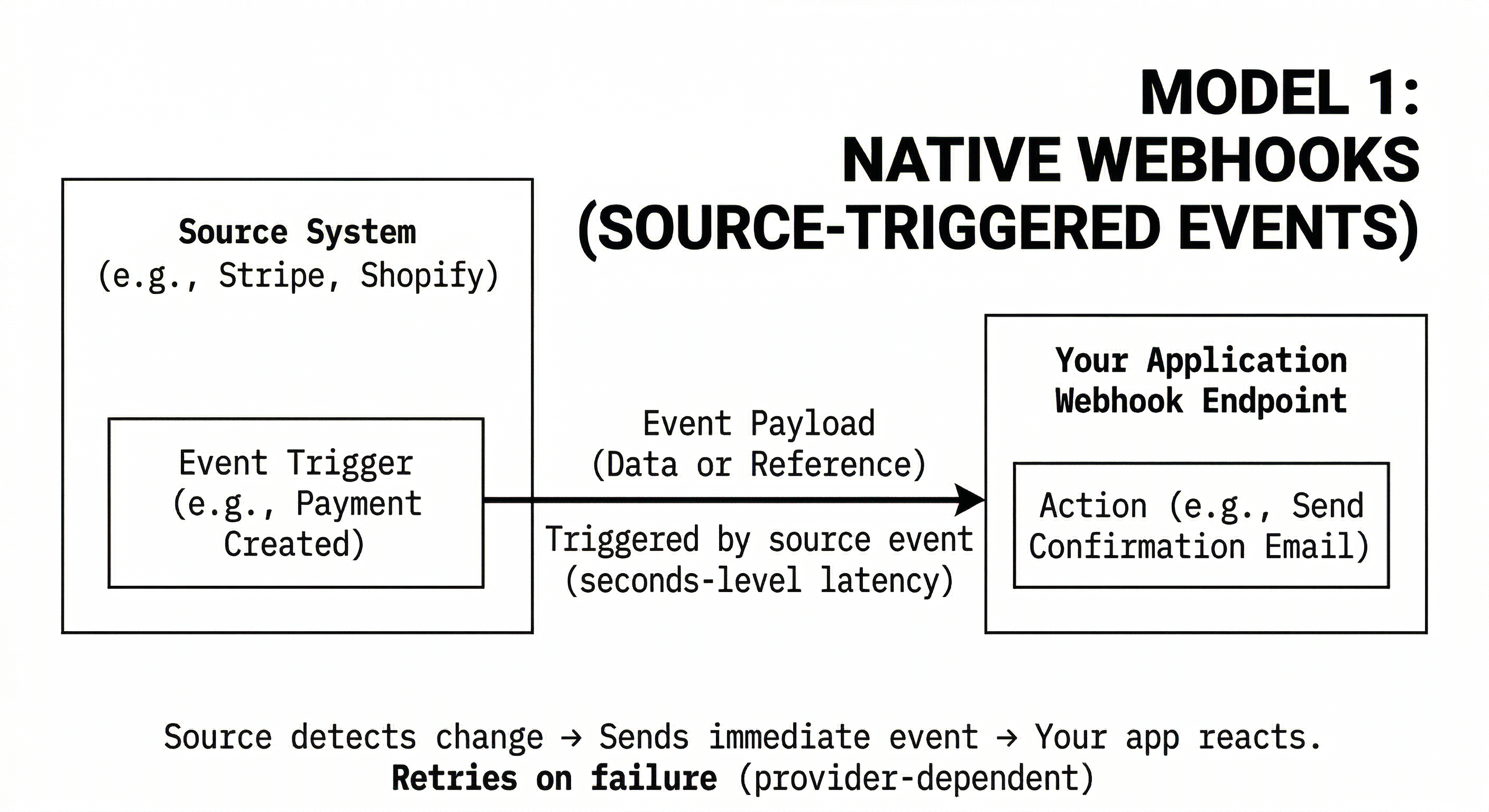
With a native webhook, the source API does the detection: it registers the change internally and sends an event to the subscribed endpoint, so nothing has to be checked from outside. Payments, e-commerce orders and Git events are the common cases.
The limit is coverage. Many SaaS APIs offer no webhooks, and many that do offer them only for some objects. Retry behaviour, ordering and payload shape also vary by integration. On Unified.to, a native webhook is registered with the integration and forwarded to you as it arrives; where the integration's event carries only an identifier, Unified.to fetches the full record before delivering it.
How do virtual webhooks detect changes?
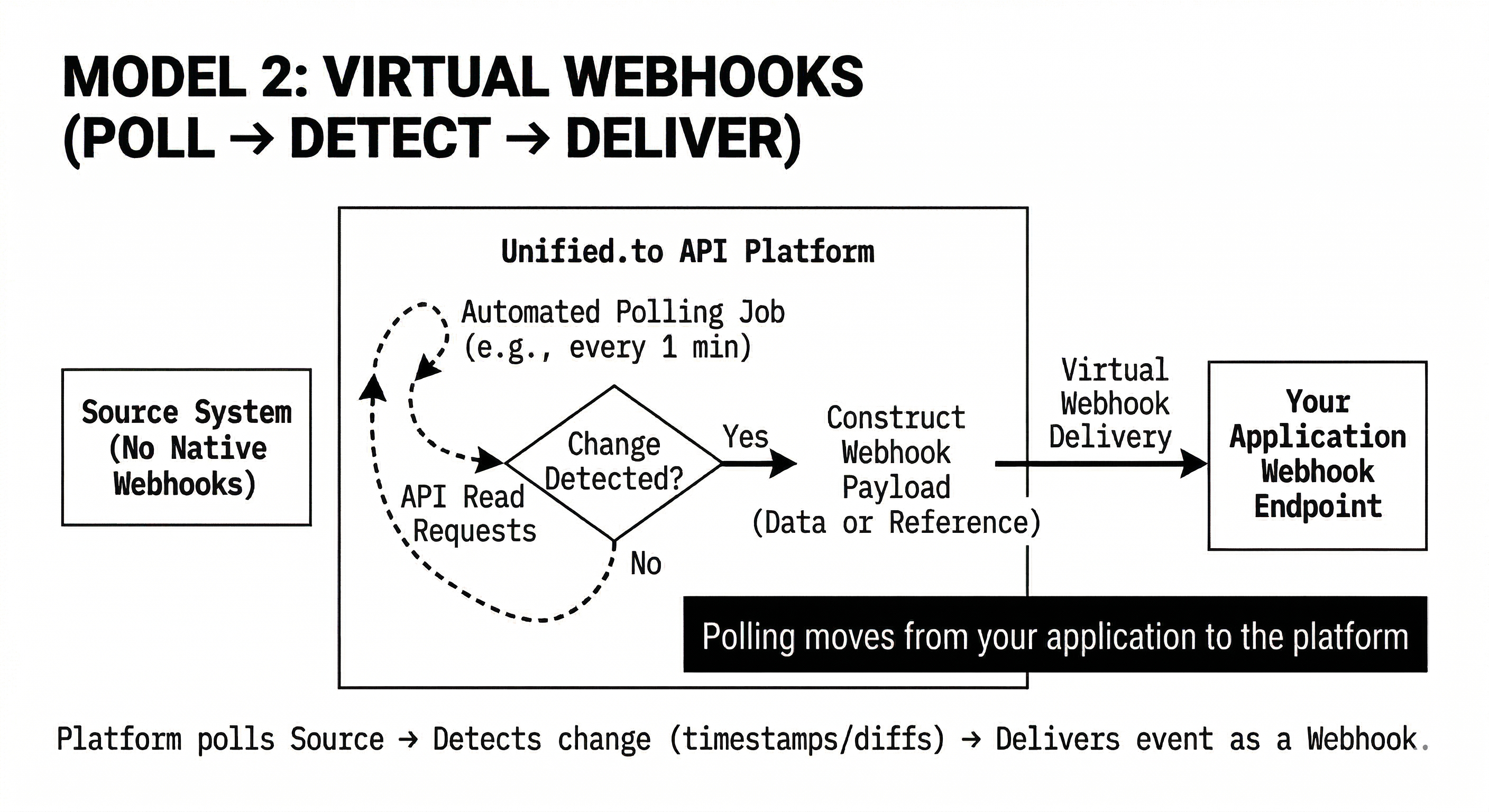
A virtual webhook detects changes by having the integration layer read the source API on an interval and compare the result with the last successfully delivered position. On Unified.to, as of September 2026, the mechanism is:
- Read on the interval. Unified.to calls the integration's list endpoint for the subscribed object on the interval you set: as often as every 1 minute on paid plans, every 60 minutes on the free plan. These calls count against the integration's rate limit, and Unified.to backs off and honours the integration's retry-after guidance when it's rate-limited.
- Detect what changed. Detection uses timestamps and cursors, reading what changed since the last successful delivery. Deleted records are detected where the integration supports it, which is shown on the object's Feature Support tab.
- Deliver the records. Changes are delivered as a signed POST containing the changed records in the API's format, one delivery per page. Nothing is held between checks.
- Advance only on success. The read position moves forward after your endpoint acknowledges the delivery. If it doesn't, the retry re-reads the same page from the integration rather than resending a stored payload, with three immediate attempts and then progressive backoff for up to roughly two weeks.
Your application subscribes once and receives events; the scheduled reads happen inside Unified.to rather than in your codebase.
The interval is the whole latency story. Average delay is half the interval, worst case the full interval. That figure varies more between platforms than the shared "virtual webhooks" label suggests. Unified.to's minimum is 1 minute on paid plans. Apideck's help centre describes its virtual webhooks as checking "typically every 24 hours," adjustable by pricing plan, re-listing all items per resource on each cycle.
How do sync-based notification systems work?
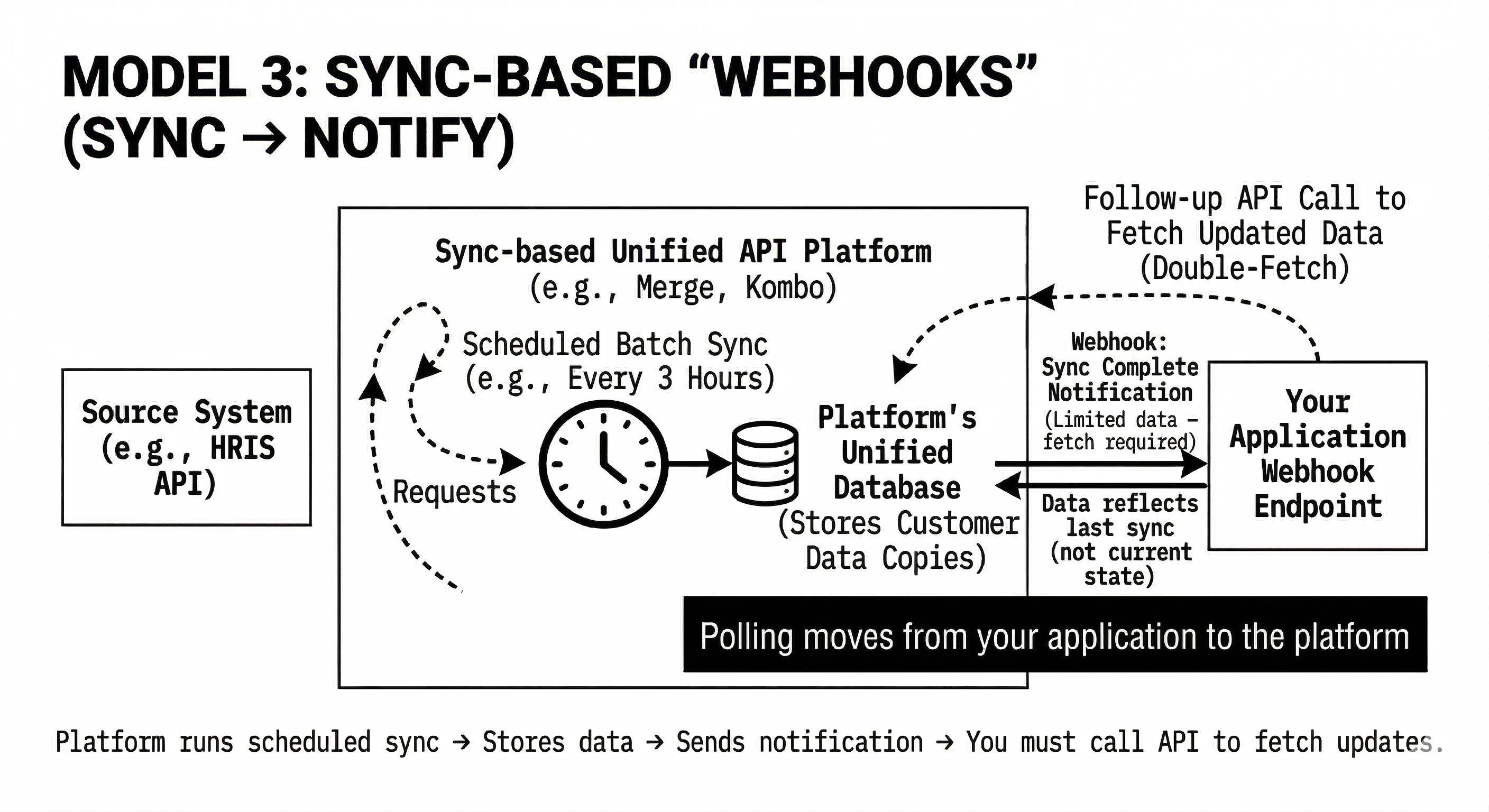
A sync-based platform runs a scheduled sync of your customer's data into its own storage, and sends a webhook when the sync completes or when it detects a difference in the stored copy; the webhook tells you something changed, not what, and your application fetches the records separately. These are notifications tied to a batch process, not change detection at the source. You react after the sync completes, not when the change occurred.
The documentation of platforms using this model says so directly. Kombo's webhook guide says its data-changed webhook fires "every time data changes in Kombo," that without upstream webhooks "notifications are sent after the next scheduled sync (latency equals the sync frequency)," and its sequence diagram ends with the customer fetching changes from Kombo's API; the default sync frequency is three hours. Merge's syncing guide tells you to start pulling data when you receive a sync notification webhook, and to keep calling your sync functions every 24 hours because "webhooks can fail." Rutter's webhook guide computes webhooks "each time an Incremental Sync runs," on a default 60-minute schedule. All quotes as of September 20, 2026.
How do the three models compare in production?
They look similar at a glance and behave differently in production on four things: latency, what the event contains, where the scheduled reading lives, and whether data is stored.
| Native webhook | Virtual webhook (Unified.to) | Sync-based notification | |
|---|---|---|---|
| Who detects the change | The source API | Unified.to, reading the source | The platform, diffing or completing a sync of its stored copy |
| Latency | As the integration sends it | Half the interval on average; 1-minute minimum on paid plans | The sync cadence: 60 minutes (Rutter default), 3 hours (Kombo default), 24-hour polling advised (Merge) |
| What the event contains | The record, or an identifier Unified.to enriches | The changed records | A signal; you fetch the records |
| Follow-up API call | No | No | Yes |
| Scheduled reads live in | Nowhere | Unified.to | The platform's sync jobs |
| Customer data stored | Briefly, during delivery attempts | Not between checks | Yes, a synced copy |
| Deleted records | Where the integration sends them | Where the integration supports it | Where the platform's sync diff exposes them |
What does your application actually receive?
An event either carries the changed records or only tells you something changed, and that decides how much retrieval code you still own. If every event requires another API call, your system still needs retrieval logic, pagination and retries after each one. On Unified.to, the data array carries the records in the same format the corresponding API endpoint returns, with the same fields options, including raw and custom fields.
Where does the polling logic live?
Scheduled reading exists in every model except a native webhook; the question is who owns it. In polling jobs, your application does. In virtual webhooks, the integration layer does. In sync systems, it runs as the platform's batch jobs against its own copy. Do you want that logic in your application, or handled once in the integration layer?
How do the models differ on data handling?
Sync-based platforms keep a stored copy of your customers' records and generate events from it; Unified.to reads from the source API when events are generated and holds nothing between checks. That affects compliance scope, because a stored copy is data you have to account for; latency, because the copy is only as current as the last sync; and migration risk, because an application built on a platform's stored copy depends on that platform's schema and schedule.
What does this look like in your application?
Two teams building the same feature end up with different code paths depending on the model.
With sync-based notifications: receive the notification, call the platform's API for changed records, handle pagination, deduplicate, manage retries.
With Unified.to virtual webhooks: verify the sig256 signature, apply the records with an idempotent write (update only when the incoming updated_at is newer), acknowledge. Watch is_healthy and subscribe to WEBHOOK_UNHEALTHY on the notifications webhook, because an unhealthy webhook stops and doesn't resume until you recreate it.
The second list is shorter, but it isn't "receive, process." Signature verification and idempotency are yours in every model, and so is health monitoring. What you don't write is the scheduler, the cursor store, the pagination and the retry loop. That difference compounds across integrations and objects.
What is the takeaway?
"Webhook support" isn't enough information; what matters is how changes are detected, when events are delivered, and whether the event carries usable data. Virtual webhooks move change detection and delivery into the integration layer and read from the source. Sync-based systems notify your application after data has been processed into a stored copy elsewhere. That distinction determines whether your application is built around events or around scheduled data retrieval.
Frequently asked questions
How does a virtual webhook know which records changed without storing anything? It stores a position, not the data. Each check reads what changed since the last successfully delivered position, using the integration's timestamp filters and cursors, and delivers those records. The position advances only after your endpoint acknowledges, so a failed delivery is retried by re-reading the same page.
Can a virtual webhook detect deleted records? On some integrations. It depends on whether the integration supports deletion detection through the check Unified.to runs; confirm it on the object's Feature Support tab before relying on it. Native webhooks deliver deletions wherever the integration sends them.
Do virtual webhook checks count against the integration's rate limit? Yes. Each check calls the integration's API, and Unified.to backs off automatically when rate-limited. What they remove is the request volume from your infrastructure, and Unified.to doesn't bill for checks that find nothing.
If a platform stores my customers' data, isn't that faster? Reads against a stored copy are fast, but the copy is only as current as the last sync, and the sync cadence sets your latency. It also puts a copy of your customers' data in another vendor's environment, which is part of your compliance scope.